udp作为服务端使用问题

codeliu

问题描述

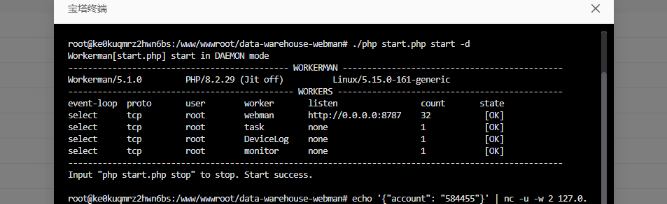
我按照demo写了代码,并且启动运行了,问题就是我推送udp没接收到也没任何log或者日志被保存
,再start.php同级新增了一个udp.php

<?php

use app\common\mq\producer\DeviceMq;
use Workerman\Worker;
use Workerman\Connection\UdpConnection;

require_once __DIR__ . '/vendor/autoload.php';

// 创建一个Worker监听2347端口,纯UDP协议,不使用任何应用层协议
$udp_worker = new Worker("udp://0.0.0.0:12349");
// 启动4个进程对外提供服务,和你原来的一致
$udp_worker->count = 4;

// 当客户端发来UDP数据时触发(核心业务逻辑区)
$udp_worker->onMessage = function( UdpConnection $connection, $data)
{
    // 处理接收到的 UDP 多播数据
    // ==================== 这里开始写你的所有业务逻辑 ====================
    try {
        // 1. 接收到的UDP原始数据,可先做清洗/解析(比如JSON解析、参数过滤)
//        $data = trim($data);
        echo "接收到多播数据: $data\n";
        (new \app\api\controller\TestController())->deal_test($data);
        \support\Log::info('收到数据');
        \support\Log::info('消息'.$data);
        $outputPath = __DIR__ . '/logs/output.txt';  // 保存在当前脚本同目录
        file_put_contents($outputPath, $data);

//        $format = json_decode($data, true);
//        if (!is_array($format)) {
//            throw new \InvalidArgumentException('JSON格式错误');
//        }
//        if (empty($format['account'])) {
//            throw new \InvalidArgumentException('缺少account');
//        }
//        echo '43444';
//        $time = time();
//        //组装数据
//       $insert =  [
//            'account' => (string)$format['account'],
//            'time' => $time,
//            'create_time' => $time
//        ];
//       //写入mq
//        (new DeviceMq())->logInsert($insert);
//        echo '5555';
        // 4. ✅ 组装返回给UDP客户端的数据
        $reply_data = [
            'code' => 200,
            'msg'  => '处理成功,数据已入队',
//            'log_id' => $log_id,
//            'data' => $user_info
        ];
        $connection->send(json_encode($reply_data, JSON_UNESCAPED_UNICODE));

    } catch (\Exception $e) {
        // 异常捕获,防止单个请求报错导致整个UDP进程挂掉
        $error_msg = "处理失败:{$e->getMessage()},行号:{$e->getLine()}";
        echo $error_msg . "\n";
        $code = ($e instanceof \InvalidArgumentException) ? 400 : 500;
        $connection->send(json_encode([
            'code' => $code,
            'msg'  => $error_msg
        ], JSON_UNESCAPED_UNICODE));
    }
};

// 运行UDP服务,和你原来的代码一致
Worker::runAll();

linux下面启动成功
root@ke0kuqmrz2hwn6bs:/www/wwwroot/data-warehouse-webman# ./php udp.php start -d
Workerman[udp.php] start in DAEMON mode
-------------------------------------------- WORKERMAN --------------------------------------------
Workerman/5.1.0 PHP/8.2.29 (Jit off) Linux/5.15.0-161-generic
--------------------------------------------- WORKERS ---------------------------------------------
event-loop proto user worker listen count state
select udp root none udp://0.0.0.0:12349 4 [OK]

Input "php udp.php stop" to stop. Start success.

就是别的推送过来不行,再当前服务器使用命令
nc -ul 12349
以及echo '{"account": "6256595"}' | nc -u 127.0.0.1 12349 这个也可以收到,就很奇怪是我哪里写的有问题吗,我是本地模拟用py去推送类型的udp脚本信息php的udp段始终收不到

后续是解决了,但是是聚合解决的,还有个小的疑问,麻烦大佬回复下不
我单独写了一个udp的文件业务
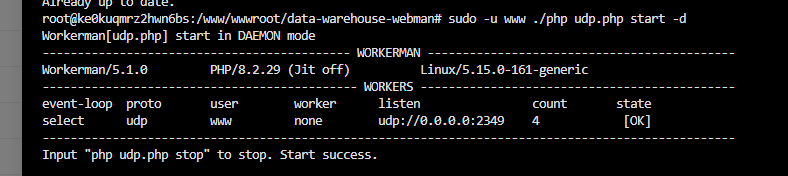
截图
但是这个时候我之前默认的项目也有这个
截图
,我的代码层要去掉这个tcp里面的业务层代码 但是我拆分开去触发udp去掉代码的时候就失效了 没法使用了 ,解决的办法是聚合了
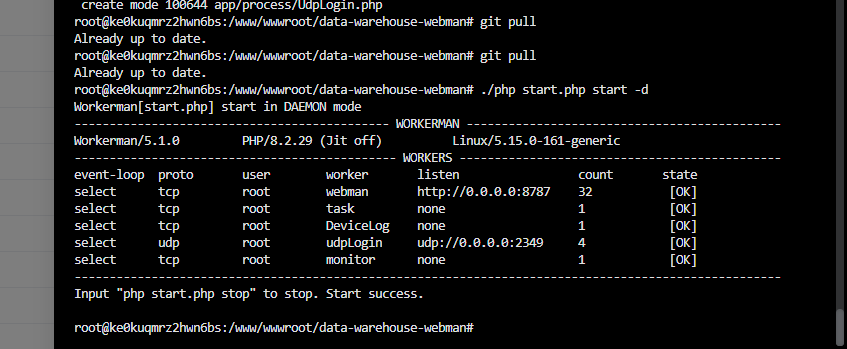
截图
,但是为什么会这样呢

86 2 0
2个回答

codeliu

已经处理,这个使用的时候不要去注入这个指定的UdpConnection $connection,
这样即可

<?php
date_default_timezone_set('Asia/Shanghai');
use app\common\mq\producer\DeviceMq;
use Workerman\Worker;
use Workerman\Connection\UdpConnection;

require_once __DIR__ . '/vendor/autoload.php';

// 创建一个Worker监听2347端口,纯UDP协议,不使用任何应用层协议
$udp_worker = new Worker("udp://0.0.0.0:2349");
// 启动4个进程对外提供服务,和你原来的一致
$udp_worker->count = 4;

// 当客户端发来UDP数据时触发(核心业务逻辑区)
$udp_worker->onMessage = function( $connection, $data)
{
    // 1. 直接向终端打印(最原始的信号)
    echo "[" . date('Y-m-d H:i:s') . "] UDP 收到数据: " . $data . "\n";

    // 2. 尝试写入文件 - 使用项目绝对路径,并检查结果
    $logFile = __DIR__ . '/logs/udp_debug.log'; // 修正为项目内的logs目录
    $content = date('Y-m-d H:i:s') . " - " . $data . "\n";
    file_put_contents($logFile, $content, FILE_APPEND);
    //格式校验判断
    $format = json_decode($data, true);
    if (json_last_error() !== JSON_ERROR_NONE || !is_array($format)) {
        echo "[" . date('Y-m-d H:i:s') . "] 错误:无效的JSON格式\n";
        // 返回错误信息给客户端
        $error_reply = [
            'code' => 400,
            'msg' => 'JSON格式错误,不要瞎搞'
        ];
        $connection->send(json_encode($error_reply, JSON_UNESCAPED_UNICODE));
        return;
    }
    $time = time();
        //组装数据
       $insert =  [
            'account' => (string)$format['account'],
            'time' => $time,
            'create_time' => $time
        ];
    (new DeviceMq())->logInsert($insert);

    // 3. 发送一个简单的响应
    $connection->send('Got: ' . $data);
};

Worker::runAll();

我的业务数据只涉及存储和分析不涉及后续的指令一块,要求不丢失和实时性的话还是走tcp,mqtt一类的吧;记得开服务器和云服务器的udp端口

  • 暂无评论
codeliu

但是这样如果业务只在udp的这个那么就可以 但是如果你是使用的webman的话就有点问题简单来说就是你先启动的start.php,再去执行的udp.php这个时候问题就来了 你的udp的业务假设和start的业务代码交汇在代码层感觉没问题但是就是调用请求都不行这个时候的解决方式我弄得是合并就是把这个udp的业务集成到之前的进程里面去由start一个入口去处理;

<?php
namespace app\process;

use app\common\mq\producer\DeviceMq;
use support\Log;

class UdpLogin
{
    public function onMessage($connection, $data)
    {
        $logFile = base_path() . '/logs/udp_debug.log';
        $now = date('Y-m-d H:i:s');
        file_put_contents($logFile, "$now - $data\n", FILE_APPEND);

        $format = json_decode($data, true);
        if (json_last_error() !== JSON_ERROR_NONE || !is_array($format)) {
            $error_reply = [
                'code' => 400,
                'msg' => 'JSON格式错误'
            ];
            $connection->send(json_encode($error_reply, JSON_UNESCAPED_UNICODE));
            return;
        }

        $time = time();
        $insert = [
            'account' => (string)($format['account'] ?? ''),
            'time' => $time,
            'create_time' => $time
        ];

        try {
            (new DeviceMq())->logInsert($insert);
            $connection->send(json_encode(['code' => 200, 'msg' => '入队成功'], JSON_UNESCAPED_UNICODE));
        } catch (\Throwable $e) {
            Log::error('UDP->MQ发送失败: '.$e->getMessage(), ['line' => $e->getLine()]);
            file_put_contents($logFile, "$now - MQ错误: {$e->getMessage()} line:{$e->getLine()}\n", FILE_APPEND);
            $connection->send(json_encode(['code' => 500, 'msg' => 'MQ发送失败'], JSON_UNESCAPED_UNICODE));
        }
    }
}

再进程里面

<?php
/**
 * This file is part of webman.
 *
 * Licensed under The MIT License
 * For full copyright and license information, please see the MIT-LICENSE.txt
 * Redistributions of files must retain the above copyright notice.
 *
 * @author    walkor<walkor@workerman.net>
 * @copyright walkor<walkor@workerman.net>
 * @link      http://www.workerman.net/
 * @license   http://www.opensource.org/licenses/mit-license.php MIT License
 */

use support\Log;
use support\Request;
use app\process\Http;

global $argv;

return [
    'webman' => [
        'handler' => Http::class,
        'listen' => 'http://0.0.0.0:8787',
        'count' => cpu_count() * 4,
        'user' => '',
        'group' => '',
        'reusePort' => false,
        'eventLoop' => '',
        'context' => [],
        'constructor' => [
            'requestClass' => Request::class,
            'logger' => Log::channel('default'),
            'appPath' => app_path(),
            'publicPath' => public_path()
        ]
    ],
    // 定时任务进程
    'task' => [
        'handler' => app\process\Task::class,
        'count' => 1,
        'constructor' => []
    ],
    //一期间产物,方案更迭
    /*'club' => [
        'handler' => app\process\consumer\ClubMq::class,
        'count' => 1,
        'constructor' => []
    ],
    'clubSupplement' => [
        'handler' => app\process\consumer\ClubVodSupplementMq::class,
        'count' => 1,
        'constructor' => []
    ],
    'clubUpdate' => [
        'handler' => app\process\consumer\ClubUpdateMq::class,
        'count' => 1,
        'constructor' => []
    ],*/
    'DeviceLog' => [
        'handler' => app\process\consumer\DeviceLogMq::class,
        'count' => 1,
        'constructor' => []
    ],
    'udpLogin' => [
        'handler' => app\process\UdpLogin::class,
        'listen' => 'udp://0.0.0.0:2349',
        'count' => 4,
        'constructor' => []
    ],
    // File update detection and automatic reload
    'monitor' => [
        'handler' => app\process\Monitor::class,
        'reloadable' => false,
        'constructor' => [
            // Monitor these directories
            'monitorDir' => array_merge([
                app_path(),
                config_path(),
                base_path() . '/process',
                base_path() . '/support',
                base_path() . '/resource',
                base_path() . '/.env',
            ], glob(base_path() . '/plugin/*/app'), glob(base_path() . '/plugin/*/config'), glob(base_path() . '/plugin/*/api')),
            // Files with these suffixes will be monitored
            'monitorExtensions' => [
                'php', 'html', 'htm', 'env'
            ],
            'options' => [
                'enable_file_monitor' => !in_array('-d', $argv) && DIRECTORY_SEPARATOR === '/',
                'enable_memory_monitor' => DIRECTORY_SEPARATOR === '/',
            ]
        ]
    ]
];

这样即可

  • 暂无评论
🔝