pfinal_notify统一通知网关
5¥
类型
应用插件
版本
1.0.0
版本更新时间
2026-06-01
大小
44.4 KB
开发商
pfinalclub
评分

pfinal_notify
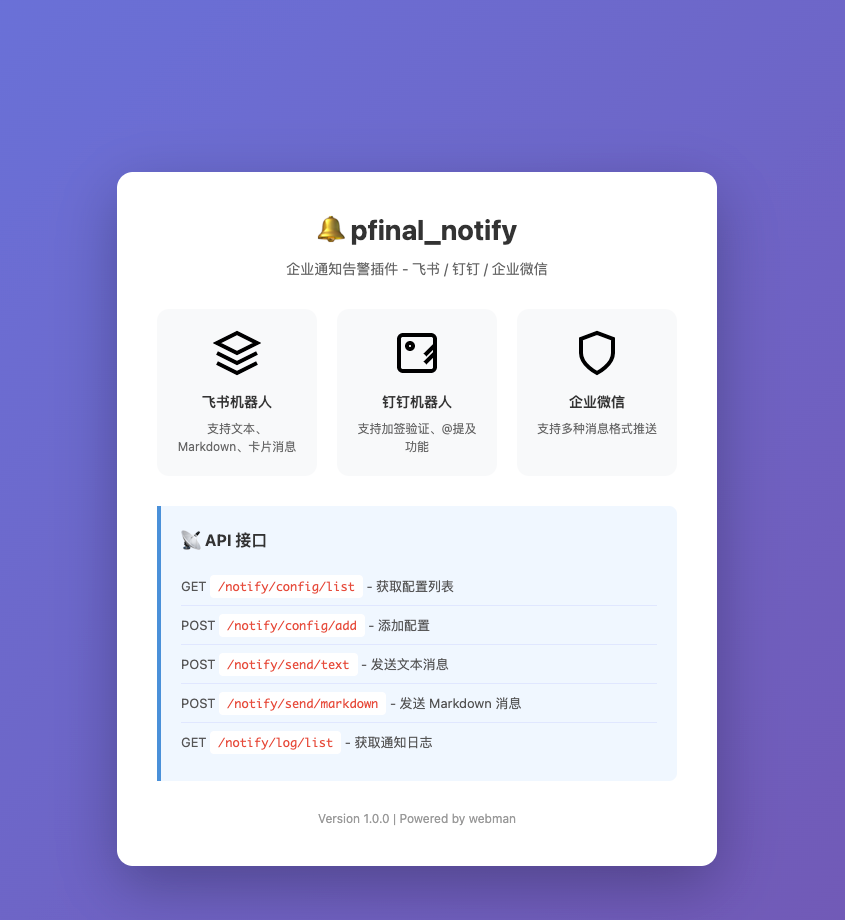
统一通知网关 — webman 插件,聚合飞书、钉钉、企业微信机器人消息推送。
通过一个 API 即可向所有平台发送文本、Markdown、卡片消息,支持失败自动重试、异步队列、广播发送、通用卡片格式自动转换。
特性
- 三合一 — 一套接口同时对接飞书、钉钉、企业微信
- 消息类型 — text / markdown / card(平台原生卡片)
- 通用卡片 — 传入统一格式,自动转换为各平台原生卡片(飞书 interactive、钉钉 actionCard、企微 template_card)
- 广播 — 一条消息同时发送给所有已启用的机器人
- 异步队列 — 支持消息入队异步发送,失败自动重试(指数退避)
- 失败重试 — 内置重试机制 + 定时消费进程
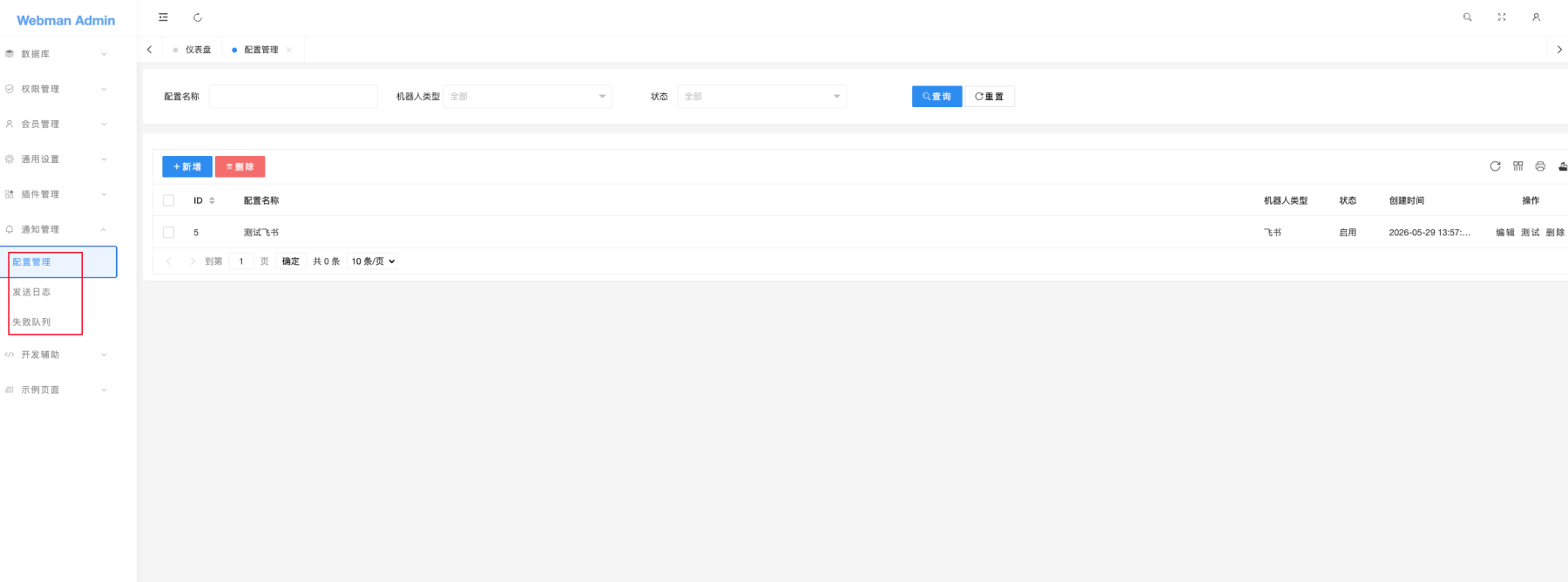
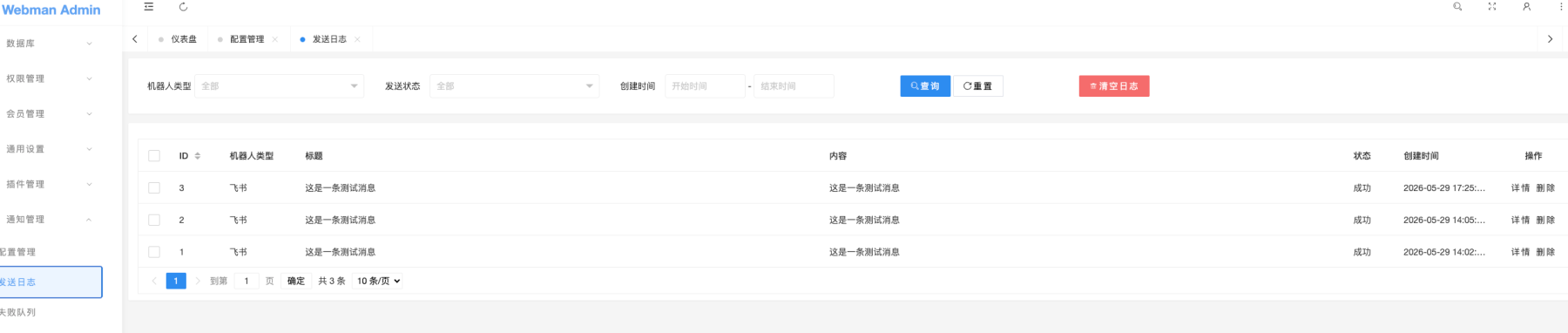
- 完备的管理后台 — 配置管理 / 发送日志 / 失败队列(Layui 界面)
- 全局辅助函数 — 一行代码即可发送,无需手动实例化
- DB 连接可配置 — 自定义数据库,默认
plugin.admin.mysql
支持的平台
| 平台 | 消息类型 | 签名方式 |
|---|---|---|
| 飞书 | text / markdown / interactive | HMAC-SHA256 |
| 钉钉 | text / markdown / actionCard | HMAC-SHA256 |
| 企业微信 | text / markdown / template_card | — |
安装
通过 webman 应用市场安装,或手动拷贝插件目录到 plugin/pfinal_notify 后运行:
php webman plugin:install pfinal_notify数据库
安装过程会自动创建三张表:
pfinal_notify_config— 机器人配置pfinal_notify_log— 发送日志pfinal_notify_queue— 失败重试队列
配置
机器人管理
访问管理后台 消息通知 → 配置管理,添加机器人配置:
| 字段 | 说明 |
|---|---|
| 名称 | 配置标识(唯一) |
| 类型 | feishu / dingtalk / wework |
| Webhook | 机器人 Webhook 地址 |
| 密钥 | 签名密钥(飞书/钉钉) |
| 启用 | 是否启用 |
配置文件 config/notify.php
return [
    // 默认配置 ID(可选)
    'default' => [
        'feishu'   => 1,
        'dingtalk' => 2,
        'wework'   => 3,
    ],
    'timeout'       => 10,       // HTTP 超时(秒)
    'log_enabled'   => true,     // 是否记录发送日志
    'retry_count'   => 2,        // 失败重试次数
    'retry_delay'   => 1000,     // 重试间隔(毫秒)
    'auto_retry'    => true,     // 发送失败自动入队重试
    'max_retry'     => 3,        // 队列最大重试次数
    'queue_interval'=> 60,       // 队列消费间隔(秒)
    'queue_limit'   => 10,       // 每次消费数量
    'db_connection' => 'plugin.admin.mysql', // 数据库连接名
];
使用方式
全局辅助函数(推荐)
直接在任意代码中调用:
// 发送文本
notify_feishu('hello world');
notify_dingtalk('hello world');
notify_wework('hello world');
notify_send('feishu', 'hello world');

// 发送 Markdown
notify_feishu_markdown('标题', '**加粗** 正文');
notify_dingtalk_markdown('标题', '# 一级标题');
notify_wework_markdown('标题', '> 引用文本');
notify_send_markdown('feishu', '标题', '正文内容');

// 异步发送(入队后立即返回)
notify_feishu_async('hello world');
notify_dingtalk_async('hello world');
notify_wework_async('hello world');
notify_send_async('feishu', 'hello world');
notify_send_markdown_async('feishu', '标题', '正文');
完整辅助函数列表
| 函数 | 说明 |
|---|---|
notify_send($type, $content, $options, $configId) |
发送文本 |
notify_send_markdown($type, $title, $content, $options, $configId) |
发送 Markdown |
notify_send_async($type, $content, $options, $configId) |
异步文本 |
notify_send_markdown_async($type, $title, $content, $options, $configId) |
异步 Markdown |
notify_feishu($content, $options, $configId) |
飞书文本 |
notify_feishu_markdown($title, $content, $options, $configId) |
飞书 Markdown |
notify_feishu_async($content, $options, $configId) |
飞书异步 |
notify_dingtalk(...) |
钉钉文本 |
notify_dingtalk_markdown(...) |
钉钉 Markdown |
notify_dingtalk_async(...) |
钉钉异步 |
notify_wework(...) |
企微文本 |
notify_wework_markdown(...) |
企微 Markdown |
notify_wework_async(...) |
企微异步 |
Service 调用
use plugin\pfinal_notify\app\service\NotifyService;

NotifyService::sendText('feishu', '你好', [], $configId);
NotifyService::sendMarkdown('dingtalk', '标题', '# 正文', []);
NotifyService::sendCard('wework', $cardArray, []);
NotifyService::sendTextAsync('feishu', '异步消息', [], $configId);
NotifyService::sendBroadcast('全员通知', 'markdown', '公告');
NotifyService::sendSimple('feishu', '部署通知', '前端已发布', [
    ['key' => '环境', 'value' => '生产'],
    ['key' => '版本', 'value' => 'v2.1.0'],
], 'success', 'https://example.com');
NotifyService::sendSimpleBroadcast('全局通知', '所有人', [], 'warning');
HTTP API
所有接口路径:POST /notify/send/*
发送消息
| 端点 | 参数 | 说明 |
|---|---|---|
/notify/send/text |
type, content, options?, config_id? | 发送文本 |
/notify/send/markdown |
type, title, content, options?, config_id? | 发送 Markdown |
/notify/send/card |
type, card, options?, config_id? | 发送卡片 |
/notify/send/text/async |
type, content, options?, config_id? | 异步文本 |
/notify/send/markdown/async |
type, title, content, options?, config_id? | 异步 Markdown |
/notify/send/card/async |
type, card, options?, config_id? | 异步卡片 |
/notify/send/test |
type?, config_id?, message_type?, content?, title? | 测试发送 |
/notify/send/broadcast |
content, message_type?, title?, options? | 广播给所有启用配置 |
/notify/send/simple |
type?, title, content, fields?, status?, url?, config_id? | 通用卡片(自动转换) |
配置管理
| 端点 | 方法 | 说明 |
|---|---|---|
/notify/config/list |
GET | 配置列表 |
/notify/config/detail |
GET | 配置详情 |
/notify/config/add |
GET/POST | 新增配置 |
/notify/config/update |
GET/POST | 更新配置 |
/notify/config/delete |
POST | 删除配置(支持批量) |
日志管理
| 端点 | 方法 | 说明 |
|---|---|---|
/notify/log/list |
GET | 日志列表 |
/notify/log/detail |
GET | 日志详情 |
/notify/log/delete |
POST | 删除日志 |
/notify/log/clear |
POST | 清空日志 |
队列管理
| 端点 | 方法 | 说明 |
|---|---|---|
/notify/queue/stats |
GET | 队列统计(各状态数量) |
/notify/queue/list |
GET | 队列列表 |
/notify/queue/detail |
GET | 队列详情 |
/notify/queue/retry |
POST | 重新发送 |
/notify/queue/delete |
POST | 删除(支持批量) |
/notify/queue/clear |
POST | 清空队列 |
/notify/queue/process |
POST | 手动触发队列消费 |
通用卡片(send/simple)参数
POST /notify/send/simple

{
    "type": "feishu",        // 不传则广播给所有类型
    "title": "部署通知",
    "content": "前端已发布到生产环境",
    "fields": [
        {"key": "环境", "value": "生产"},
        {"key": "版本", "value": "v2.1.0"}
    ],
    "status": "success",     // info | success | warning | error
    "url": "https://..."
}
自动转换为各平台原生卡片格式:
| 平台 | 格式 | 状态颜色 |
|---|---|---|
| 飞书 | interactive (header + column_set + button) | blue / green / yellow / red |
| 钉钉 | actionCard(有 url)或 markdown(无 url) | 标题色 |
| 企微 | template_card (text_notice) | — |
通用响应格式
{
    "code": 0,
    "message": "发送成功",
    "data": { ... }
}
管理后台
插件安装后,在 webman admin 左侧菜单可见:
| 菜单 | 功能 |
|---|---|
| 配置管理 | 增删改查机器人配置 |
| 发送日志 | 查看发送记录 |
| 失败队列 | 查看失败消息、手动重试、批量删除 |
数据库
pfinal_notify_config     -- 机器人配置(名称 / 类型 / webhook / 密钥 / 启用)
pfinal_notify_log        -- 发送日志(配置ID / 类型 / 标题 / 内容 / 状态 / 错误信息)
pfinal_notify_queue      -- 失败重试队列(配置ID / 消息类型 / 内容 / 状态 / 重试次数 / 下次重试时间)
架构
client/         平台适配层
├── BaseClient.php          —— HTTP 客户端基类(签名、请求)
├── ClientInterface.php     —— 接口契约
├── FeishuClient.php        —— 飞书适配
├── DingTalkClient.php      —— 钉钉适配
└── WeWorkClient.php        —— 企业微信适配

service/        业务逻辑层
├── NotifyService.php       —— 核心服务(发送、日志、配置管理、广播、通用卡片)
└── FailQueueService.php    —— 队列服务(入队、统计、重试)

task/           异步任务
└── AsyncNotifyTask.php     —— 队列消费任务(processQueue)

process/        常驻进程
└── NotifyQueueProcess.php  —— 定时消费进程(基于 Timer)

controller/     控制器
└── NotifyController.php    —— HTTP API 控制器
发送流程
请求 → Controller → NotifyService → Client(Feishu/DingTalk/WeWork)→ HTTP POST → 平台
                                        │
                                        ├─ 失败 → 自动重试(配置次数)
                                        ├─ 仍失败 → 入队(FailQueue)
                                        └─ 记录日志 → pfinal_notify_log
队列消费流程
NotifyQueueProcess(Timer 定时)
    → AsyncNotifyTask::processQueue()
        → 读取 pending 记录
        → NotifyService::send*()(设置 $processingFromQueue 防止循环入队)
            → 成功 → 标记 success
            → 失败 → 更新 retry_count,指数退避计算 next_retry_at
版本历史记录
1.0.0
2026-05-29
1.实现 配置管理 — list / insert / update
2.实现 发送日志 — 搜索 / 详情弹窗 / 清空
3.实现 失败队列 — 搜索 / 重试 / 处理全部 / 批量删除
4.实现 FeishuClient
5.实现 DingTalkClient
2.实现 发送日志 — 搜索 / 详情弹窗 / 清空
3.实现 失败队列 — 搜索 / 重试 / 处理全部 / 批量删除
4.实现 FeishuClient
5.实现 DingTalkClient
评分及评论
0
满分5分