workerman=一个完整的进程健康监控系统。
小知识:
Workerman 不同进程之间内存隔离,无法直接共享变量
health_monitor.php
<?php
/**
 * Workerman 子进程健康监控系统
 * 功能:心跳检测、状态监控、异常告警、自动恢复
 */

require_once __DIR__ . '/vendor/autoload.php';

use Workerman\Worker;
use Workerman\Timer;
use Workerman\Connection\TcpConnection;

// ============================================
// 全局变量:存储健康状态数据
// ============================================
class HealthMonitor {
    // 存储每个进程的健康数据
    public static $healthData = [];

    // 心跳超时时间(秒)
    public static $heartbeatTimeout = 10;

    // 健康检查间隔(秒)
    public static $checkInterval = 5;

    // CPU 告警阈值(%)
    public static $cpuThreshold = 80;

    // 内存告警阈值(%)
    public static $memoryThreshold = 80;

    // 异常重启次数阈值
    public static $maxRestarts = 5;

    // 重启计数器
    public static $restartCount = [];
}

// ============================================
// 业务 Worker:被监控的工作进程
// ============================================
$business_worker = new Worker('tcp://0.0.0.0:8888');
$business_worker->name = 'BusinessWorker';
$business_worker->count = 4;

$business_worker->onWorkerStart = function($worker) {
    $pid = posix_getpid();
    $workerId = $worker->id;

    echo "[BusinessWorker 启动] PID: {$pid}, Worker ID: {$workerId}\n";

    // 初始化健康数据
    HealthMonitor::$healthData[$pid] = [
        'pid' => $pid,
        'worker_id' => $workerId,
        'worker_name' => $worker->name,
        'status' => 'healthy',
        'last_heartbeat' => time(),
        'start_time' => time(),
        'cpu' => 0,
        'memory' => 0,
        'memory_mb' => 0,
        'connections' => 0,
        'requests' => 0,
        'errors' => 0,
        'warnings' => []
    ];

    // 每 3 秒发送心跳
    Timer::add(3, function() use ($pid, $workerId, $worker) {
        // 更新心跳时间
        if (isset(HealthMonitor::$healthData[$pid])) {
            HealthMonitor::$healthData[$pid]['last_heartbeat'] = time();
            HealthMonitor::$healthData[$pid]['connections'] = count($worker->connections);

            // 获取进程资源使用情况
            $stats = getProcessStats($pid);
            if ($stats) {
                HealthMonitor::$healthData[$pid]['cpu'] = $stats['cpu'];
                HealthMonitor::$healthData[$pid]['memory'] = $stats['memory'];
                HealthMonitor::$healthData[$pid]['memory_mb'] = $stats['memoryMB'];

                // 检查告警
                checkHealthWarnings($pid);
            }
        }
    });

    // 模拟处理任务
    Timer::add(5, function() use ($pid, $workerId) {
        echo "[{$pid}] Worker {$workerId} 处理任务...\n";

        // 模拟随机错误
        if (rand(1, 20) == 1) {
            echo "[{$pid}] Worker {$workerId} 发生错误!\n";
            if (isset(HealthMonitor::$healthData[$pid])) {
                HealthMonitor::$healthData[$pid]['errors']++;
            }
        }

        // 更新请求计数
        if (isset(HealthMonitor::$healthData[$pid])) {
            HealthMonitor::$healthData[$pid]['requests']++;
        }
    });
};

$business_worker->onConnect = function($connection) {
    $pid = posix_getpid();
    echo "[{$pid}] 新连接\n";
    $connection->send("连接成功!由进程 {$pid} 为您服务\n");
};

$business_worker->onMessage = function($connection, $data) {
    $pid = posix_getpid();

    // 更新请求计数
    if (isset(HealthMonitor::$healthData[$pid])) {
        HealthMonitor::$healthData[$pid]['requests']++;
    }

    $connection->send("进程 {$pid} 已处理: {$data}");
};

$business_worker->onWorkerStop = function($worker) {
    $pid = posix_getpid();
    echo "[BusinessWorker 停止] PID: {$pid}\n";

    // 清理健康数据
    if (isset(HealthMonitor::$healthData[$pid])) {
        unset(HealthMonitor::$healthData[$pid]);
    }
};

// ============================================
// 监控 Worker:监控所有进程健康状态
// ============================================
$monitor_worker = new Worker();
$monitor_worker->name = 'HealthMonitor';
$monitor_worker->count = 1;

$monitor_worker->onWorkerStart = function($worker) {
    echo "[HealthMonitor 启动] 健康监控服务已启动\n";
    echo "检查间隔: " . HealthMonitor::$checkInterval . " 秒\n";
    echo "心跳超时: " . HealthMonitor::$heartbeatTimeout . " 秒\n\n";

    // 定期健康检查
    Timer::add(HealthMonitor::$checkInterval, function() {
        performHealthCheck();
    });

    // 每 10 秒输出健康报告
    Timer::add(10, function() {
        printHealthReport();
    });
};

// ============================================
// WebSocket 监控服务:实时推送监控数据
// ============================================
$ws_worker = new Worker("websocket://0.0.0.0:8282");
$ws_worker->name = 'MonitorWebSocket';
$ws_worker->count = 1;

$ws_worker->onConnect = function($connection) {
    echo "[WebSocket] 新客户端连接\n";
};

$ws_worker->onMessage = function($connection, $data) {
    $message = json_decode($data, true);

    if (isset($message['action']) && $message['action'] === 'getHealth') {
        $healthData = prepareHealthData();
        $connection->send(json_encode([
            'action' => 'healthUpdate',
            'data' => $healthData,
            'timestamp' => date('Y-m-d H:i:s')
        ]));
    }
};

$ws_worker->onWorkerStart = function($worker) {
    // 每 2 秒推送健康数据给所有客户端
    Timer::add(2, function() use ($worker) {
        $healthData = prepareHealthData();
        $data = json_encode([
            'action' => 'healthUpdate',
            'data' => $healthData,
            'timestamp' => date('Y-m-d H:i:s')
        ]);

        foreach($worker->connections as $connection) {
            $connection->send($data);
        }
    });
};

// ============================================
// HTTP 服务:提供监控页面
// ============================================
$http_worker = new Worker("http://0.0.0.0:8080");
$http_worker->name = 'HttpServer';
$http_worker->count = 1;

$http_worker->onMessage = function($connection, $request) {
    $path = $request->path();

    if ($path === '/' || $path === '/health.html') {
        $htmlFile = __DIR__ . '/health_monitor.html';
        if (file_exists($htmlFile)) {
            $connection->send(file_get_contents($htmlFile));
        } else {
            $connection->send("HTTP/1.1 404 Not Found\r\n\r\nhealth_monitor.html not found");
        }
    } elseif ($path === '/api/health') {
        $healthData = prepareHealthData();
        $connection->send(json_encode($healthData));
    } else {
        $connection->send("HTTP/1.1 404 Not Found\r\n\r\n404 Not Found");
    }
};

// ============================================
// 辅助函数
// ============================================

/**
 * 获取进程统计信息
 */
function getProcessStats($pid) {
    if (!posix_kill($pid, 0)) {
        return null;
    }

    $cmd = sprintf("ps -p %d -o %%cpu,%%mem,rss --no-headers 2>/dev/null", $pid);
    $output = shell_exec($cmd);

    if (empty($output)) {
        return null;
    }

    $parts = preg_split('/\s+/', trim($output));

    if (count($parts) < 3) {
        return null;
    }

    return [
        'cpu' => (float)$parts[0],
        'memory' => (float)$parts[1],
        'memoryMB' => round((float)$parts[2] / 1024, 2)
    ];
}

/**
 * 检查健康告警
 */
function checkHealthWarnings($pid) {
    if (!isset(HealthMonitor::$healthData[$pid])) {
        return;
    }

    $data = &HealthMonitor::$healthData[$pid];
    $data['warnings'] = [];
    $data['status'] = 'healthy';

    // 检查 CPU
    if ($data['cpu'] > HealthMonitor::$cpuThreshold) {
        $data['warnings'][] = "CPU 使用率过高: {$data['cpu']}%";
        $data['status'] = 'warning';
        echo "[告警] PID {$pid} CPU 使用率过高: {$data['cpu']}%\n";
    }

    // 检查内存
    if ($data['memory'] > HealthMonitor::$memoryThreshold) {
        $data['warnings'][] = "内存使用率过高: {$data['memory']}%";
        $data['status'] = 'warning';
        echo "[告警] PID {$pid} 内存使用率过高: {$data['memory']}%\n";
    }

    // 检查错误率
    if ($data['requests'] > 0) {
        $errorRate = ($data['errors'] / $data['requests']) * 100;
        if ($errorRate > 10) {
            $data['warnings'][] = sprintf("错误率过高: %.2f%%", $errorRate);
            $data['status'] = 'warning';
            echo "[告警] PID {$pid} 错误率过高: {$errorRate}%\n";
        }
    }
}

/**
 * 执行健康检查
 */
function performHealthCheck() {
    $now = time();
    $unhealthyCount = 0;

    foreach (HealthMonitor::$healthData as $pid => &$data) {
        // 检查心跳超时
        $timeSinceHeartbeat = $now - $data['last_heartbeat'];

        if ($timeSinceHeartbeat > HealthMonitor::$heartbeatTimeout) {
            $data['status'] = 'unhealthy';
            $data['warnings'][] = "心跳超时: {$timeSinceHeartbeat} 秒";
            echo "[严重] PID {$pid} 心跳超时!已超时 {$timeSinceHeartbeat} 秒\n";
            $unhealthyCount++;

            // 检查进程是否真的死了
            if (!posix_kill($pid, 0)) {
                echo "[严重] PID {$pid} 进程已死亡!\n";
                unset(HealthMonitor::$healthData[$pid]);

                // 记录重启次数
                if (!isset(HealthMonitor::$restartCount[$pid])) {
                    HealthMonitor::$restartCount[$pid] = 0;
                }
                HealthMonitor::$restartCount[$pid]++;

                // 检查是否超过重启次数限制
                if (HealthMonitor::$restartCount[$pid] > HealthMonitor::$maxRestarts) {
                    echo "[严重] PID {$pid} 重启次数过多,需要人工介入!\n";
                }
            }
        }
    }

    if ($unhealthyCount > 0) {
        echo "[健康检查] 发现 {$unhealthyCount} 个不健康的进程\n";
    }
}

/**
 * 打印健康报告
 */
function printHealthReport() {
    echo "\n========================================\n";
    echo "健康监控报告 - " . date('Y-m-d H:i:s') . "\n";
    echo "========================================\n";

    $totalProcesses = count(HealthMonitor::$healthData);
    $healthyCount = 0;
    $warningCount = 0;
    $unhealthyCount = 0;

    foreach (HealthMonitor::$healthData as $data) {
        switch ($data['status']) {
            case 'healthy':
                $healthyCount++;
                break;
            case 'warning':
                $warningCount++;
                break;
            case 'unhealthy':
                $unhealthyCount++;
                break;
        }
    }

    echo "总进程数: {$totalProcesses}\n";
    echo "健康: {$healthyCount} | 警告: {$warningCount} | 异常: {$unhealthyCount}\n";
    echo "========================================\n";

    foreach (HealthMonitor::$healthData as $data) {
        $uptime = time() - $data['start_time'];
        $statusSymbol = $data['status'] === 'healthy' ? '✓' : ($data['status'] === 'warning' ? '⚠' : '✗');

        echo "{$statusSymbol} PID {$data['pid']} (Worker {$data['worker_id']})\n";
        echo "  状态: {$data['status']}\n";
        echo "  CPU: {$data['cpu']}% | 内存: {$data['memory']}% ({$data['memory_mb']}MB)\n";
        echo "  连接数: {$data['connections']} | 请求数: {$data['requests']} | 错误数: {$data['errors']}\n";
        echo "  运行时长: " . formatUptime($uptime) . "\n";

        if (!empty($data['warnings'])) {
            echo "  告警: " . implode(', ', $data['warnings']) . "\n";
        }
        echo "\n";
    }
}

/**
 * 准备健康数据用于 API/WebSocket
 * 直接从系统获取所有进程信息
 */
function prepareHealthData() {
    $processes = [];

    // 查找主进程(多种方式尝试)
    $masterPid = 0;

    // 方式1: 通过 master process 标识查找
    $cmd = "ps -ef | grep 'master process' | grep 'health_monitor.php' | grep -v grep | awk '{print $2}' | head -1";
    $masterPid = (int)trim(shell_exec($cmd));

    // 方式2: 如果方式1失败,通过 Workerman 标识查找
    if (!$masterPid) {
        $cmd = "ps -ef | grep 'Workerman\\[health_monitor.php\\]' | grep -v grep | awk '{print $2}' | head -1";
        $masterPid = (int)trim(shell_exec($cmd));
    }

    // 方式3: 如果还是失败,查找 health_monitor.php 的父进程
    if (!$masterPid) {
        $cmd = "ps -ef | grep 'health_monitor.php' | grep -v grep | awk '{print $2}' | head -1";
        $masterPid = (int)trim(shell_exec($cmd));
    }

    if (!$masterPid) {
        return [
            'summary' => [
                'total' => 0,
                'healthy' => 0,
                'warning' => 0,
                'unhealthy' => 0
            ],
            'processes' => []
        ];
    }

    // 获取所有子进程
    $cmd = "ps --ppid {$masterPid} -o pid,cmd --no-headers 2>/dev/null";
    $output = shell_exec($cmd);

    if (empty($output)) {
        return [
            'summary' => [
                'total' => 0,
                'healthy' => 0,
                'warning' => 0,
                'unhealthy' => 0
            ],
            'processes' => []
        ];
    }

    $lines = explode("\n", trim($output));
    $healthyCount = 0;
    $warningCount = 0;
    $unhealthyCount = 0;

    foreach ($lines as $line) {
        if (empty($line)) continue;

        $parts = preg_split('/\s+/', trim($line), 2);
        $pid = (int)$parts[0];
        $cmd = $parts[1] ?? '';

        // 只监控 BusinessWorker
        if (strpos($cmd, 'BusinessWorker') === false) {
            continue;
        }

        // 获取进程统计信息
        $stats = getProcessStats($pid);

        if (!$stats) {
            continue;
        }

        // 确定 Worker ID
        preg_match('/worker process  BusinessWorker (\d+)/', $cmd, $matches);
        $workerId = isset($matches[1]) ? (int)$matches[1] : 0;

        // 判断健康状态
        $status = 'healthy';
        $warnings = [];

        if ($stats['cpu'] > HealthMonitor::$cpuThreshold) {
            $status = 'warning';
            $warnings[] = "CPU 使用率过高: {$stats['cpu']}%";
        }

        if ($stats['memory'] > HealthMonitor::$memoryThreshold) {
            $status = 'warning';
            $warnings[] = "内存使用率过高: {$stats['memory']}%";
        }

        // 统计状态
        switch ($status) {
            case 'healthy': $healthyCount++; break;
            case 'warning': $warningCount++; break;
            case 'unhealthy': $unhealthyCount++; break;
        }

        // 获取进程启动时间
        $etimeCmd = "ps -p {$pid} -o etime --no-headers 2>/dev/null";
        $etime = trim(shell_exec($etimeCmd));
        $startTime = time() - parseElapsedTime($etime);

        $processes[] = [
            'pid' => $pid,
            'worker_id' => $workerId,
            'worker_name' => 'BusinessWorker',
            'status' => $status,
            'last_heartbeat' => time(),
            'start_time' => $startTime,
            'cpu' => $stats['cpu'],
            'memory' => $stats['memory'],
            'memory_mb' => $stats['memoryMB'],
            'connections' => 0,  // 无法跨进程获取
            'requests' => 0,     // 无法跨进程获取
            'errors' => 0,       // 无法跨进程获取
            'warnings' => $warnings
        ];
    }

    return [
        'summary' => [
            'total' => count($processes),
            'healthy' => $healthyCount,
            'warning' => $warningCount,
            'unhealthy' => $unhealthyCount
        ],
        'processes' => $processes
    ];
}

/**
 * 解析 etime 格式转换为秒数
 */
function parseElapsedTime($etime) {
    $etime = trim($etime);
    $seconds = 0;

    // 格式: [[dd-]hh:]mm:ss
    if (strpos($etime, '-') !== false) {
        list($days, $time) = explode('-', $etime);
        $seconds += (int)$days * 86400;
    } else {
        $time = $etime;
    }

    $parts = array_reverse(explode(':', $time));
    $multipliers = [1, 60, 3600]; // 秒、分、时

    foreach ($parts as $i => $value) {
        $seconds += (int)$value * $multipliers[$i];
    }

    return $seconds;
}

/**
 * 格式化运行时长
 */
function formatUptime($seconds) {
    $hours = floor($seconds / 3600);
    $minutes = floor(($seconds % 3600) / 60);
    $secs = $seconds % 60;

    return sprintf("%02d:%02d:%02d", $hours, $minutes, $secs);
}

// ============================================
// 启动信息
// ============================================
echo "======================================\n";
echo "Workerman 健康监控系统\n";
echo "======================================\n";
echo "BusinessWorker : tcp://0.0.0.0:8888 (4个进程)\n";
echo "HealthMonitor  : 健康检查服务\n";
echo "WebSocket      : ws://0.0.0.0:8282\n";
echo "监控页面        : http://localhost:8080/health.html\n";
echo "======================================\n\n";

// 运行所有 Worker
Worker::runAll();
解释:
这是一个完整的 Workerman 子进程健康监控系统,用于监控所有 Worker 进程的健康状态。
📋 第 1-11 行:文件头和依赖导入
<?php
/**
- Workerman 子进程健康监控系统
-
功能:心跳检测、状态监控、异常告警、自动恢复
*/require_once __DIR__ . '/vendor/autoload.php';
use Workerman\Worker;
use Workerman\Timer;
use Workerman\Connection\TcpConnection;作用:
- 加载 Composer 自动加载器
- 导入必要的 Workerman 类
- Worker - 核心进程类
- Timer - 定时器
- TcpConnection - TCP 连接类
🔧 第 16-37 行:配置类 HealthMonitor
class HealthMonitor {
// 存储每个进程的健康数据
public static $healthData = [];// 心跳超时时间(秒)
public static $heartbeatTimeout = 10;// 健康检查间隔(秒)
public static $checkInterval = 5;// CPU 告警阈值(%)
public static $cpuThreshold = 80;// 内存告警阈值(%)
public static $memoryThreshold = 80;// 异常重启次数阈值
public static $maxRestarts = 5;// 重启计数器
public static $restartCount = [];
}详细解释:
配置项 默认值 说明 $healthData [] 存储所有进程的健康数据(进程内存隔离,只在当前进程有效) $heartbeatTimeout 10 秒 心跳超时阈值,超过此时间未收到心跳视为异常 $checkInterval 5 秒 健康检查的执行间隔 $cpuThreshold 80% CPU 使用率告警阈值,超过触发警告 $memoryThreshold 80% 内存使用率告警阈值 $maxRestarts 5 次 进程最大重启次数,超过需人工介入 $restartCount [] 记录每个进程的重启次数 为什么用 static?
- 静态属性在类级别共享
- 可以在不同函数间访问同一份数据
- 注意:多进程间仍然隔离
🟦 第 42-133 行:BusinessWorker - 业务进程
创建 Worker(第 42-44 行)
$business_worker = new Worker('tcp://0.0.0.0:8888');
$business_worker->name = 'BusinessWorker';
$business_worker->count = 4;作用:
- 创建 TCP 服务器,监听 8888 端口
- 命名为 BusinessWorker
- 创建 4 个子进程(充分利用多核 CPU)
onWorkerStart - 进程启动(第 46-106 行)
$business_worker->onWorkerStart = function($worker) {
$pid = posix_getpid();
$workerId = $worker->id;echo "[BusinessWorker 启动] PID: {$pid}, Worker ID: {$workerId}\n";
触发时机: 每个子进程启动时执行一次
- 初始化健康数据(第 52-67 行)
HealthMonitor::$healthData[$pid] = [
'pid' => $pid, // 进程 ID
'worker_id' => $workerId, // Worker ID (0-3)
'worker_name' => $worker->name, // Worker 名称
'status' => 'healthy', // 健康状态
'last_heartbeat' => time(), // 最后心跳时间
'start_time' => time(), // 启动时间
'cpu' => 0, // CPU 使用率
'memory' => 0, // 内存使用率
'memory_mb' => 0, // 内存占用 MB
'connections' => 0, // 连接数
'requests' => 0, // 请求数
'errors' => 0, // 错误数
'warnings' => [] // 告警列表
];作用: 为当前进程创建健康数据结构
注意:
- 这个数据只在当前子进程内有效
- 由于进程隔离,其他进程看不到这份数据
- 这就是为什么后面需要用 ps 命令跨进程获取数据
- 心跳定时器(第 69-87 行)
Timer::add(3, function() use ($pid, $workerId, $worker) {
// 更新心跳时间
if (isset(HealthMonitor::$healthData[$pid])) {
HealthMonitor::$healthData[$pid]['last_heartbeat'] = time();
HealthMonitor::$healthData[$pid]['connections'] = count($worker->connections);// 获取进程资源使用情况 $stats = getProcessStats($pid); if ($stats) { HealthMonitor::$healthData[$pid]['cpu'] = $stats['cpu']; HealthMonitor::$healthData[$pid]['memory'] = $stats['memory']; HealthMonitor::$healthData[$pid]['memory_mb'] = $stats['memoryMB']; // 检查告警 checkHealthWarnings($pid); }}
});执行周期: 每 3 秒
工作流程:
- 更新心跳时间戳 last_heartbeat
- 统计当前连接数
- 调用 getProcessStats() 获取 CPU/内存使用情况
- 调用 checkHealthWarnings() 检查是否需要告警
心跳机制:
子进程 监控进程
│ │
├─ 每3秒更新 last_heartbeat │
│ │
│ 每5秒检查
│ 心跳是否超时
│ │
│ 如果超过10秒未更新 ──────────> 触发告警
- 模拟任务定时器(第 89-105 行)
Timer::add(5, function() use ($pid, $workerId) {
echo "[{$pid}] Worker {$workerId} 处理任务...\n";// 模拟随机错误(5% 概率)
if (rand(1, 20) == 1) {
echo "[{$pid}] Worker {$workerId} 发生错误!\n";
if (isset(HealthMonitor::$healthData[$pid])) {
HealthMonitor::$healthData[$pid]['errors']++;
}
}// 更新请求计数
if (isset(HealthMonitor::$healthData[$pid])) {
HealthMonitor::$healthData[$pid]['requests']++;
}
});执行周期: 每 5 秒
作用:
- 模拟业务处理
- 随机产生错误(5% 概率,用于测试错误率告警)
- 更新请求计数器
onConnect - 连接回调(第 108-112 行)
$business_worker->onConnect = function($connection) {
$pid = posix_getpid();
echo "[{$pid}] 新连接\n";
$connection->send("连接成功!由进程 {$pid} 为您服务\n");
};触发时机: 客户端连接到 8888 端口时
onMessage - 消息回调(第 114-123 行)
$business_worker->onMessage = function($connection, $data) {
$pid = posix_getpid();// 更新请求计数
if (isset(HealthMonitor::$healthData[$pid])) {
HealthMonitor::$healthData[$pid]['requests']++;
}$connection->send("进程 {$pid} 已处理: {$data}");
};触发时机: 客户端发送数据时
作用: 统计请求数
onWorkerStop - 停止回调(第 125-133 行)
$business_worker->onWorkerStop = function($worker) {
$pid = posix_getpid();
echo "[BusinessWorker 停止] PID: {$pid}\n";// 清理健康数据
if (isset(HealthMonitor::$healthData[$pid])) {
unset(HealthMonitor::$healthData[$pid]);
}
};触发时机: 进程退出前
作用: 清理资源
🟩 第 138-156 行:HealthMonitor - 监控进程
$monitor_worker = new Worker();
$monitor_worker->name = 'HealthMonitor';
$monitor_worker->count = 1;$monitor_worker->onWorkerStart = function($worker) {
echo "[HealthMonitor 启动] 健康监控服务已启动\n";
echo "检查间隔: " . HealthMonitor::$checkInterval . " 秒\n";
echo "心跳超时: " . HealthMonitor::$heartbeatTimeout . " 秒\n\n";// 定期健康检查
Timer::add(HealthMonitor::$checkInterval, function() {
performHealthCheck(); // 每 5 秒执行健康检查
});// 每 10 秒输出健康报告
Timer::add(10, function() {
printHealthReport(); // 每 10 秒打印报告
});
};关键点:
- new Worker() - 没有监听地址,纯后台监控进程
- count = 1 - 只需要 1 个监控进程
- 两个定时器:
- 5 秒一次健康检查
- 10 秒一次输出报告
🟨 第 161-196 行:WebSocket - 实时推送
$ws_worker = new Worker("websocket://0.0.0.0:8282");
$ws_worker->name = 'MonitorWebSocket';
$ws_worker->count = 1;onMessage - 处理客户端请求(第 169-180 行)
$ws_worker->onMessage = function($connection, $data) {
$message = json_decode($data, true);if (isset($message['action']) && $message['action'] === 'getHealth') {
$healthData = prepareHealthData();
$connection->send(json_encode([
'action' => 'healthUpdate',
'data' => $healthData,
'timestamp' => date('Y-m-d H:i:s')
]));
}
};作用: 当客户端请求健康数据时,立即返回
onWorkerStart - 自动推送(第 182-196 行)
$ws_worker->onWorkerStart = function($worker) {
// 每 2 秒推送健康数据给所有客户端
Timer::add(2, function() use ($worker) {
$healthData = prepareHealthData();
$data = json_encode([
'action' => 'healthUpdate',
'data' => $healthData,
'timestamp' => date('Y-m-d H:i:s')
]);foreach($worker->connections as $connection) { $connection->send($data); }});
};作用: 每 2 秒自动推送数据给所有连接的浏览器
🟪 第 201-221 行:HTTP Server - 监控页面
$http_worker = new Worker("http://0.0.0.0:8080");
$http_worker->name = 'HttpServer';
$http_worker->count = 1;$http_worker->onMessage = function($connection, $request) {
$path = $request->path();if ($path === '/' || $path === '/health.html') {
$htmlFile = __DIR__ . '/health_monitor.html';
if (file_exists($htmlFile)) {
$connection->send(file_get_contents($htmlFile));
} else {
$connection->send("HTTP/1.1 404 Not Found\r\n\r\nhealth_monitor.html not found");
}
} elseif ($path === '/api/health') {
$healthData = prepareHealthData();
$connection->send(json_encode($healthData));
} else {
$connection->send("HTTP/1.1 404 Not Found\r\n\r\n404 Not Found");
}
};路由:
- / 或 /health.html - 返回监控页面HTML
- /api/health - 返回JSON格式的健康数据
- 其他 - 404
🔧 辅助函数详解
getProcessStats() - 获取进程统计(第 230-253 行)
function getProcessStats($pid) {
if (!posix_kill($pid, 0)) {
return null;
}$cmd = sprintf("ps -p %d -o %%cpu,%%mem,rss --no-headers 2>/dev/null", $pid);
$output = shell_exec($cmd);if (empty($output)) {
return null;
}$parts = preg_split('/\s+/', trim($output));
if (count($parts) < 3) {
return null;
}return [
'cpu' => (float)$parts[0],
'memory' => (float)$parts[1],
'memoryMB' => round((float)$parts[2] / 1024, 2)
];
}工作流程:
- posix_kill($pid, 0) - 检查进程是否存在(不杀死,只检查)
- 执行 ps 命令获取 CPU、内存、RSS
- 解析输出并返回数组
返回示例:
[
'cpu' => 12.5, // CPU 使用率 12.5%
'memory' => 2.3, // 内存使用率 2.3%
'memoryMB' => 45.6 // 实际内存占用 45.6MB
]
checkHealthWarnings() - 检查告警(第 258-290 行)
function checkHealthWarnings($pid) {
if (!isset(HealthMonitor::$healthData[$pid])) {
return;
}$data = &HealthMonitor::$healthData[$pid];
$data['warnings'] = [];
$data['status'] = 'healthy';// 检查 CPU
if ($data['cpu'] > HealthMonitor::$cpuThreshold) {
$data['warnings'][] = "CPU 使用率过高: {$data['cpu']}%";
$data['status'] = 'warning';
echo "[告警] PID {$pid} CPU 使用率过高: {$data['cpu']}%\n";
}// 检查内存
if ($data['memory'] > HealthMonitor::$memoryThreshold) {
$data['warnings'][] = "内存使用率过高: {$data['memory']}%";
$data['status'] = 'warning';
echo "[告警] PID {$pid} 内存使用率过高: {$data['memory']}%\n";
}// 检查错误率
if ($data['requests'] > 0) {
$errorRate = ($data['errors'] / $data['requests']) * 100;
if ($errorRate > 10) {
$data['warnings'][] = sprintf("错误率过高: %.2f%%", $errorRate);
$data['status'] = 'warning';
echo "[告警] PID {$pid} 错误率过高: {$errorRate}%\n";
}
}
}告警条件:
- CPU > 80%
- 内存 > 80%
- 错误率 > 10%
状态变化:
- 正常:status = 'healthy'
- 触发告警:status = 'warning'
performHealthCheck() - 健康检查(第 295-331 行)
function performHealthCheck() {
$now = time();
$unhealthyCount = 0;foreach (HealthMonitor::$healthData as $pid => &$data) {
// 检查心跳超时
$timeSinceHeartbeat = $now - $data['last_heartbeat'];if ($timeSinceHeartbeat > HealthMonitor::$heartbeatTimeout) { $data['status'] = 'unhealthy'; $data['warnings'][] = "心跳超时: {$timeSinceHeartbeat} 秒"; echo "[严重] PID {$pid} 心跳超时!已超时 {$timeSinceHeartbeat} 秒\n"; $unhealthyCount++; // 检查进程是否真的死了 if (!posix_kill($pid, 0)) { echo "[严重] PID {$pid} 进程已死亡!\n"; unset(HealthMonitor::$healthData[$pid]); // 记录重启次数 if (!isset(HealthMonitor::$restartCount[$pid])) { HealthMonitor::$restartCount[$pid] = 0; } HealthMonitor::$restartCount[$pid]++; // 检查是否超过重启次数限制 if (HealthMonitor::$restartCount[$pid] > HealthMonitor::$maxRestarts) { echo "[严重] PID {$pid} 重启次数过多,需要人工介入!\n"; } } }}
if ($unhealthyCount > 0) {
echo "[健康检查] 发现 {$unhealthyCount} 个不健康的进程\n";
}
}检查流程:
- 计算距离上次心跳的时间
- 如果超过 10 秒 → 标记为 unhealthy
- 使用 posix_kill($pid, 0) 检查进程是否真的死了
- 如果死了:
- 从健康数据中移除
- 记录重启次数
- 超过 5 次重启 → 需要人工介入
prepareHealthData() - 准备数据(第 385-515 行)
这是最关键的函数,用于跨进程获取数据。
function prepareHealthData() {
$processes = [];// 查找主进程(多种方式尝试)
$masterPid = 0;// 方式1: 通过 master process 标识查找
$cmd = "ps -ef | grep 'master process' | grep 'health_monitor.php' | grep -v grep | awk '{print $2}' | head -1";
$masterPid = (int)trim(shell_exec($cmd));// 方式2: 如果方式1失败,通过 Workerman 标识查找
if (!$masterPid) {
$cmd = "ps -ef | grep 'Workerman\[health_monitor.php\]' | grep -v grep | awk '{print $2}' | head -1";
$masterPid = (int)trim(shell_exec($cmd));
}// 方式3: 如果还是失败,查找 health_monitor.php 的父进程
if (!$masterPid) {
$cmd = "ps -ef | grep 'health_monitor.php' | grep -v grep | awk '{print $2}' | head -1";
$masterPid = (int)trim(shell_exec($cmd));
}为什么需要多种方式?
- 不同系统下进程名格式不同
- WSL、Linux、macOS 的 ps 输出有差异
- 多种fallback确保能找到主进程
// 获取所有子进程
$cmd = "ps --ppid {$masterPid} -o pid,cmd --no-headers 2>/dev/null";
$output = shell_exec($cmd);ps --ppid 命令:
- --ppid {$masterPid} - 查找父进程为主进程的所有子进程
- -o pid,cmd - 只输出 PID 和命令
- --no-headers - 不显示表头
foreach ($lines as $line) {
if (empty($line)) continue;$parts = preg_split('/\s+/', trim($line), 2); $pid = (int)$parts[0]; $cmd = $parts[1] ?? ''; // 只监控 BusinessWorker if (strpos($cmd, 'BusinessWorker') === false) { continue; }过滤逻辑:
- 只监控包含 "BusinessWorker" 的进程
- 跳过 HealthMonitor、WebSocket、HttpServer
最终返回格式:
return [
'summary' => [
'total' => 4,
'healthy' => 3,
'warning' => 1,
'unhealthy' => 0
],
'processes' => [
[
'pid' => 1639,
'worker_id' => 0,
'status' => 'healthy',
'cpu' => 12.5,
'memory' => 2.3,
...
],
...
]
];
🚀 第 556-566 行:启动
echo "======================================\n";
echo "Workerman 健康监控系统\n";
echo "======================================\n";
echo "BusinessWorker : tcp://0.0.0.0:8888 (4个进程)\n";
echo "HealthMonitor : 健康检查服务\n";
echo "WebSocket : ws://0.0.0.0:8282\n";
echo "监控页面 : http://localhost:8080/health.html\n";
echo "======================================\n\n";// 运行所有 Worker
Worker::runAll();Worker::runAll() 做了什么?
- Fork 所有子进程(4+1+1+1 = 7个)
- 初始化每个子进程
- 进入事件循环
- 阻塞运行,直到收到停止信号
📊 系统架构总结
主进程 (Master)
├── BusinessWorker #0 (PID: 1639) ──┐
├── BusinessWorker #1 (PID: 1640) ├─ 被监控的业务进程
├── BusinessWorker #2 (PID: 1641) │ 每3秒发送心跳
├── BusinessWorker #3 (PID: 1642) ──┘
│
├── HealthMonitor (PID: xxx) ────────── 监控进程
│ ├── 每5秒健康检查 检查心跳超时
│ └── 每10秒输出报告 检查资源使用
│
├── WebSocket (PID: xxx) ────────────── WebSocket 服务
│ └── 每2秒推送数据到浏览器 实时更新
│
└── HttpServer (PID: xxx) ───────────── HTTP 服务
├── GET / → 监控页面
└── GET /api/health → JSON 数据
这就是完整的健康监控系统!核心思想是:
- 业务进程发送心跳
- 监控进程检查心跳和资源
- WebSocket 推送数据到浏览器
- HTTP Server 提供监控页面
所有进程协同工作,实现完整的健康监控!🎉
health_monitor.html
<!DOCTYPE html>
<html lang="zh-CN">
<head>
<meta charset="UTF-8">
<meta name="viewport" content="width=device-width, initial-scale=1.0">
<title>进程健康监控</title>
<style>
    * {
        margin: 0;
        padding: 0;
        box-sizing: border-box;
    }

    body {
        font-family: 'Segoe UI', Tahoma, Geneva, Verdana, sans-serif;
        background: linear-gradient(135deg, #1e3c72 0%, #2a5298 100%);
        padding: 20px;
        color: #333;
    }

    .container {
        max-width: 1400px;
        margin: 0 auto;
    }

    .header {
        background: white;
        border-radius: 10px;
        padding: 20px;
        margin-bottom: 20px;
        box-shadow: 0 4px 6px rgba(0,0,0,0.1);
    }

    .header h1 {
        color: #1e3c72;
        margin-bottom: 10px;
        display: flex;
        align-items: center;
        gap: 10px;
    }

    .status-bar {
        display: flex;
        gap: 20px;
        align-items: center;
        margin-top: 10px;
    }

    .status-indicator {
        display: flex;
        align-items: center;
        gap: 8px;
    }

    .status-dot {
        width: 12px;
        height: 12px;
        border-radius: 50%;
        background: #22c55e;
        animation: pulse 2s infinite;
    }

    .status-dot.disconnected {
        background: #ef4444;
        animation: none;
    }

    @keyframes pulse {
        0%, 100% { opacity: 1; }
        50% { opacity: 0.5; }
    }

    .summary-cards {
        display: grid;
        grid-template-columns: repeat(auto-fit, minmax(250px, 1fr));
        gap: 20px;
        margin-bottom: 20px;
    }

    .card {
        background: white;
        border-radius: 10px;
        padding: 20px;
        box-shadow: 0 4px 6px rgba(0,0,0,0.1);
        transition: transform 0.2s;
    }

    .card:hover {
        transform: translateY(-5px);
    }

    .card h3 {
        color: #666;
        font-size: 14px;
        margin-bottom: 10px;
        text-transform: uppercase;
    }

    .card .value {
        font-size: 36px;
        font-weight: bold;
        margin-bottom: 5px;
    }

    .card.healthy .value { color: #22c55e; }
    .card.warning .value { color: #f59e0b; }
    .card.unhealthy .value { color: #ef4444; }

    .processes-section {
        background: white;
        border-radius: 10px;
        padding: 20px;
        box-shadow: 0 4px 6px rgba(0,0,0,0.1);
    }

    .processes-section h2 {
        color: #1e3c72;
        margin-bottom: 20px;
    }

    .process-item {
        background: #f8f9fa;
        border-radius: 8px;
        padding: 15px;
        margin-bottom: 15px;
        border-left: 4px solid #22c55e;
        transition: all 0.3s;
    }

    .process-item.warning {
        border-left-color: #f59e0b;
        background: #fffbeb;
    }

    .process-item.unhealthy {
        border-left-color: #ef4444;
        background: #fef2f2;
        animation: shake 0.5s;
    }

    @keyframes shake {
        0%, 100% { transform: translateX(0); }
        25% { transform: translateX(-10px); }
        75% { transform: translateX(10px); }
    }

    .process-header {
        display: flex;
        justify-content: space-between;
        align-items: center;
        margin-bottom: 10px;
    }

    .process-title {
        font-size: 18px;
        font-weight: bold;
        display: flex;
        align-items: center;
        gap: 10px;
    }

    .status-badge {
        display: inline-block;
        padding: 4px 12px;
        border-radius: 20px;
        font-size: 12px;
        font-weight: bold;
    }

    .status-badge.healthy {
        background: #dcfce7;
        color: #16a34a;
    }

    .status-badge.warning {
        background: #fef3c7;
        color: #d97706;
    }

    .status-badge.unhealthy {
        background: #fee2e2;
        color: #dc2626;
    }

    .process-stats {
        display: grid;
        grid-template-columns: repeat(auto-fit, minmax(150px, 1fr));
        gap: 15px;
        margin-top: 15px;
    }

    .stat-item {
        background: white;
        padding: 10px;
        border-radius: 5px;
    }

    .stat-label {
        font-size: 12px;
        color: #666;
        margin-bottom: 5px;
    }

    .stat-value {
        font-size: 20px;
        font-weight: bold;
        color: #333;
    }

    .progress-bar {
        width: 100%;
        height: 20px;
        background: #e5e7eb;
        border-radius: 10px;
        overflow: hidden;
        margin-top: 5px;
    }

    .progress-fill {
        height: 100%;
        background: linear-gradient(90deg, #22c55e 0%, #16a34a 100%);
        transition: width 0.3s ease;
        display: flex;
        align-items: center;
        justify-content: center;
        color: white;
        font-size: 12px;
        font-weight: bold;
    }

    .progress-fill.warning {
        background: linear-gradient(90deg, #f59e0b 0%, #d97706 100%);
    }

    .progress-fill.danger {
        background: linear-gradient(90deg, #ef4444 0%, #dc2626 100%);
    }

    .warnings {
        background: #fef3c7;
        border-left: 3px solid #f59e0b;
        padding: 10px;
        border-radius: 5px;
        margin-top: 10px;
    }

    .warnings h4 {
        color: #d97706;
        margin-bottom: 5px;
        font-size: 14px;
    }

    .warnings ul {
        list-style: none;
        padding-left: 0;
    }

    .warnings li {
        color: #d97706;
        padding: 3px 0;
        font-size: 13px;
    }

    .warnings li:before {
        content: "⚠ ";
        margin-right: 5px;
    }

    .no-data {
        text-align: center;
        padding: 40px;
        color: #999;
    }

    .last-update {
        text-align: center;
        color: white;
        margin-top: 20px;
        font-size: 14px;
    }

    .status-icon {
        font-size: 24px;
    }

    .stat-row {
        display: flex;
        gap: 10px;
        margin-bottom: 10px;
    }

    .stat-row .stat-item {
        flex: 1;
    }
</style>
</head>
<body>
<div class="container">
    <div class="header">
        <h1>
            <span>❤️</span>
            进程健康监控系统
        </h1>
        <div class="status-bar">
            <div class="status-indicator">
                <div class="status-dot" id="statusDot"></div>
                <span id="connectionStatus">连接中...</span>
            </div>
            <span id="lastUpdate"></span>
        </div>
    </div>

    <div class="summary-cards">
        <div class="card">
            <h3>总进程数</h3>
            <div class="value" id="totalProcesses">0</div>
        </div>
        <div class="card healthy">
            <h3>✓ 健康</h3>
            <div class="value" id="healthyCount">0</div>
        </div>
        <div class="card warning">
            <h3>⚠ 警告</h3>
            <div class="value" id="warningCount">0</div>
        </div>
        <div class="card unhealthy">
            <h3>✗ 异常</h3>
            <div class="value" id="unhealthyCount">0</div>
        </div>
    </div>

    <div class="processes-section">
        <h2>进程详情</h2>
        <div id="processList">
            <div class="no-data">等待数据...</div>
        </div>
    </div>

    <div class="last-update" id="footerUpdate"></div>
</div>

<script>
    let ws = null;
    let reconnectTimer = null;

    function connect() {
        ws = new WebSocket('ws://localhost:8282');

        ws.onopen = function() {
            console.log('WebSocket 连接成功');
            updateConnectionStatus(true);
            ws.send(JSON.stringify({ action: 'getHealth' }));
        };

        ws.onmessage = function(event) {
            const message = JSON.parse(event.data);
            if (message.action === 'healthUpdate') {
                updateUI(message.data, message.timestamp);
            }
        };

        ws.onclose = function() {
            console.log('WebSocket 连接关闭');
            updateConnectionStatus(false);
            reconnectTimer = setTimeout(connect, 5000);
        };

        ws.onerror = function(error) {
            console.error('WebSocket 错误:', error);
        };
    }

    function updateConnectionStatus(connected) {
        const statusDot = document.getElementById('statusDot');
        const statusText = document.getElementById('connectionStatus');

        if (connected) {
            statusDot.classList.remove('disconnected');
            statusText.textContent = '已连接';
        } else {
            statusDot.classList.add('disconnected');
            statusText.textContent = '连接断开';
        }
    }

    function updateUI(data, timestamp) {
        // 更新汇总数据
        document.getElementById('totalProcesses').textContent = data.summary.total;
        document.getElementById('healthyCount').textContent = data.summary.healthy;
        document.getElementById('warningCount').textContent = data.summary.warning;
        document.getElementById('unhealthyCount').textContent = data.summary.unhealthy;
        document.getElementById('lastUpdate').textContent = `最后更新: ${timestamp}`;
        document.getElementById('footerUpdate').textContent = `最后更新时间: ${timestamp}`;

        // 更新进程列表
        const processList = document.getElementById('processList');

        if (data.processes && data.processes.length > 0) {
            let html = '';

            data.processes.forEach(process => {
                const statusIcon = getStatusIcon(process.status);
                const uptime = formatUptime(Date.now() / 1000 - process.start_time);
                const errorRate = process.requests > 0
                    ? ((process.errors / process.requests) * 100).toFixed(2)
                    : 0;

                html += `
                    <div class="process-item ${process.status}">
                        <div class="process-header">
                            <div class="process-title">
                                <span class="status-icon">${statusIcon}</span>
                                <span>PID ${process.pid} - Worker ${process.worker_id}</span>
                            </div>
                            <span class="status-badge ${process.status}">${getStatusText(process.status)}</span>
                        </div>

                        <div class="process-stats">
                            <div class="stat-item">
                                <div class="stat-label">CPU 使用率</div>
                                ${renderProgressBar(process.cpu, '%')}
                            </div>
                            <div class="stat-item">
                                <div class="stat-label">内存使用率</div>
                                ${renderProgressBar(process.memory, '%')}
                            </div>
                            <div class="stat-item">
                                <div class="stat-label">内存占用</div>
                                <div class="stat-value">${process.memory_mb} MB</div>
                            </div>
                            <div class="stat-item">
                                <div class="stat-label">运行时长</div>
                                <div class="stat-value">${uptime}</div>
                            </div>
                            <div class="stat-item">
                                <div class="stat-label">连接数</div>
                                <div class="stat-value">${process.connections}</div>
                            </div>
                            <div class="stat-item">
                                <div class="stat-label">请求数</div>
                                <div class="stat-value">${process.requests}</div>
                            </div>
                            <div class="stat-item">
                                <div class="stat-label">错误数</div>
                                <div class="stat-value" style="color: ${process.errors > 0 ? '#ef4444' : '#22c55e'}">${process.errors}</div>
                            </div>
                            <div class="stat-item">
                                <div class="stat-label">错误率</div>
                                <div class="stat-value" style="color: ${errorRate > 5 ? '#ef4444' : '#22c55e'}">${errorRate}%</div>
                            </div>
                        </div>

                        ${process.warnings && process.warnings.length > 0 ? `
                            <div class="warnings">
                                <h4>⚠ 告警信息</h4>
                                <ul>
                                    ${process.warnings.map(w => `<li>${w}</li>`).join('')}
                                </ul>
                            </div>
                        ` : ''}
                    </div>
                `;
            });

            processList.innerHTML = html;
        } else {
            processList.innerHTML = '<div class="no-data">暂无进程数据</div>';
        }
    }

    function getStatusIcon(status) {
        const icons = {
            'healthy': '✅',
            'warning': '⚠️',
            'unhealthy': '❌'
        };
        return icons[status] || '❓';
    }

    function getStatusText(status) {
        const texts = {
            'healthy': '健康',
            'warning': '警告',
            'unhealthy': '异常'
        };
        return texts[status] || '未知';
    }

    function renderProgressBar(value, unit) {
        let className = '';
        if (value > 80) className = 'danger';
        else if (value > 50) className = 'warning';

        return `
            <div class="progress-bar">
                <div class="progress-fill ${className}" style="width: ${Math.min(value, 100)}%">
                    ${value}${unit}
                </div>
            </div>
        `;
    }

    function formatUptime(seconds) {
        const hours = Math.floor(seconds / 3600);
        const minutes = Math.floor((seconds % 3600) / 60);
        const secs = Math.floor(seconds % 60);
        return `${pad(hours)}:${pad(minutes)}:${pad(secs)}`;
    }

    function pad(num) {
        return num.toString().padStart(2, '0');
    }

    // 页面加载时连接
    connect();

    // 页面关闭时断开连接
    window.addEventListener('beforeunload', function() {
        if (ws) {
            ws.close();
        }
        if (reconnectTimer) {
            clearTimeout(reconnectTimer);
        }
    });
</script>
</body>
</html>
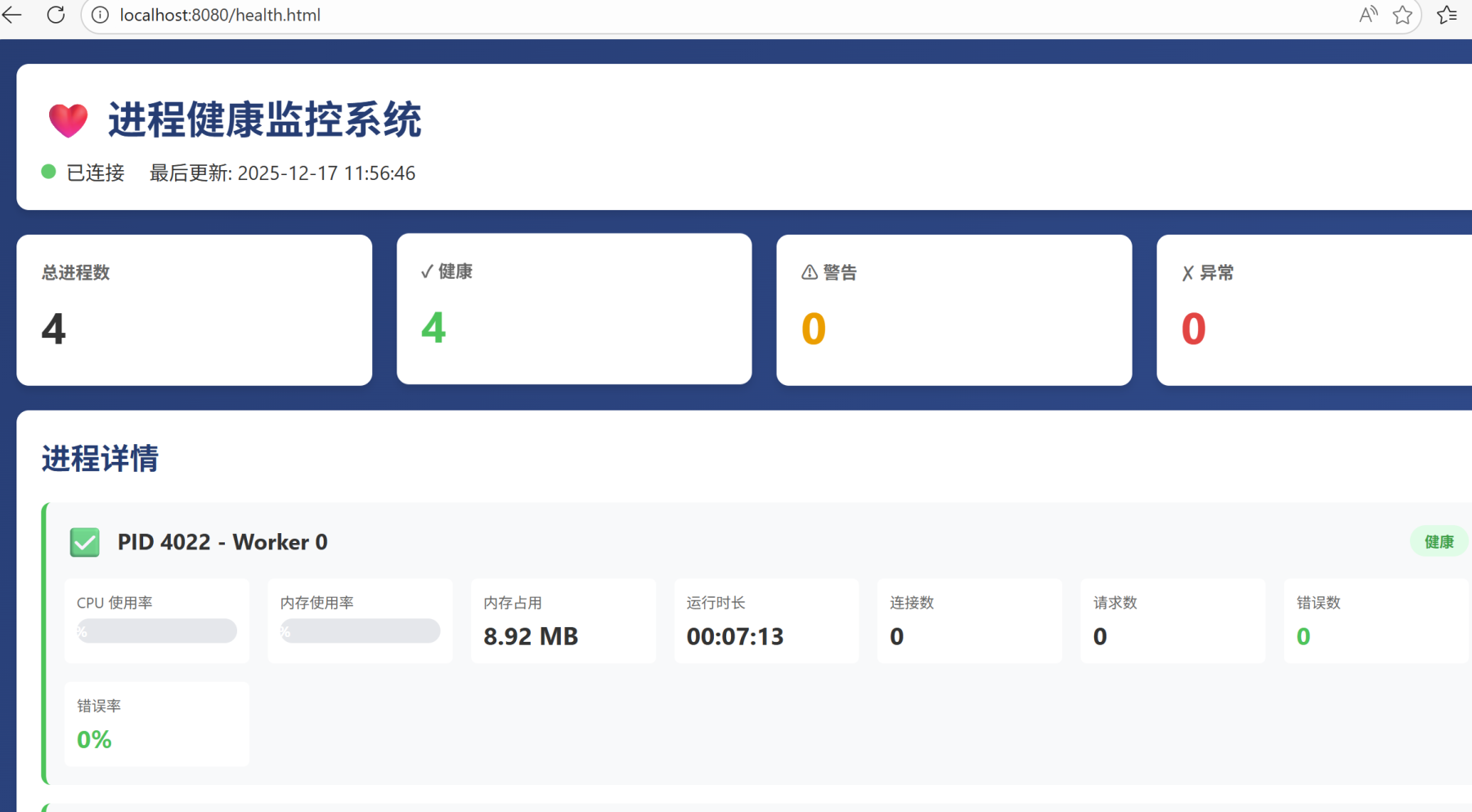
先运行php health_monitor.php start
3个评论

学习下
谢谢 我会继续努力的
不错,可以写成webman插件
谢谢 知道了
感谢分享
好